

Add the postcode to a WooCommerce checkout
Gatepost Postcode for WooCommerce adds a postcode field to the checkout for Nigerian addresses. WooCommerce hides that field for Nigeria. The plugin shows it again, and it checks what the customer types.
The field shows only when the address is in Nigeria. It works in the classic checkout and in the checkout block. The plugin needs PHP 8.1, WordPress 6.7 and WooCommerce 10.0, or later versions of each.
Install
Section titled “Install”The plugin is not published yet. It has no release, and it is not on WordPress.org. There is no zip file to download today.
To try the plugin now, build the zip file from the source. You need Git, PHP 8.1 or later and Composer.
git clone https://github.com/gatepost-dev/woocommercecd woocommercecomposer installscripts/build-zipThe script writes dist/gatepost-postcode-for-woocommerce.zip. Do not use the source archive that GitHub offers. It does not hold the bundled SDK, so the plugin cannot start.
Install and activate WooCommerce first. Then, in WordPress, go to Plugins > Add New Plugin > Upload Plugin, upload the zip file, and activate it.
Choose the settings
Section titled “Choose the settings”The settings are under WooCommerce > Settings > Advanced > Nigerian postcodes. The name of the section is gatepost_postcode. A store owner never types a name from the table. The names help a developer find each setting in the code. All are option names, except gatepost_wc_remove_key. It is a field of the form, and WooCommerce does not save it.
| Setting | Name | Values | Default |
|---|---|---|---|
| Live secret key | gatepost_wc_secret_key |
A key that starts with nipost_live_ |
empty |
| Remove the key | gatepost_wc_remove_key |
A box that removes the saved key. It shows only when a key is saved. | off |
| Required | gatepost_wc_required |
A box. A customer in Nigeria must enter a postcode. | off |
| Old 6-digit postcodes | gatepost_wc_legacy |
accept (“Accept them”) or reject (“Ask for the new postcode”) |
accept |
| Lookup | gatepost_wc_confirm |
level1 (“Ask NIPOST whether the postcode exists”) or none (“Check the format only”) |
level1 |
The plugin never prints the saved key. The key field stays empty, and a line tells you that a key is saved. An empty field keeps the saved key. To remove the key, tick the box “Remove the key” and save. A new key that you type in the same save replaces the old key.
The plugin saves only a live secret key. NIPOST’s test keys work only on its staging gateway, which the plugin does not use. A key that does not start with nipost_live_ gives an error, and the saved key stays as it was. Read how to get a key. The plugin does not issue keys.
What the customer sees
Section titled “What the customer sees”A customer with a Nigerian address sees a Postcode field. The plugin checks the format while the customer fills in the form. It names the problem and suggests a fix for a common typo, such as the letter O in place of a zero.
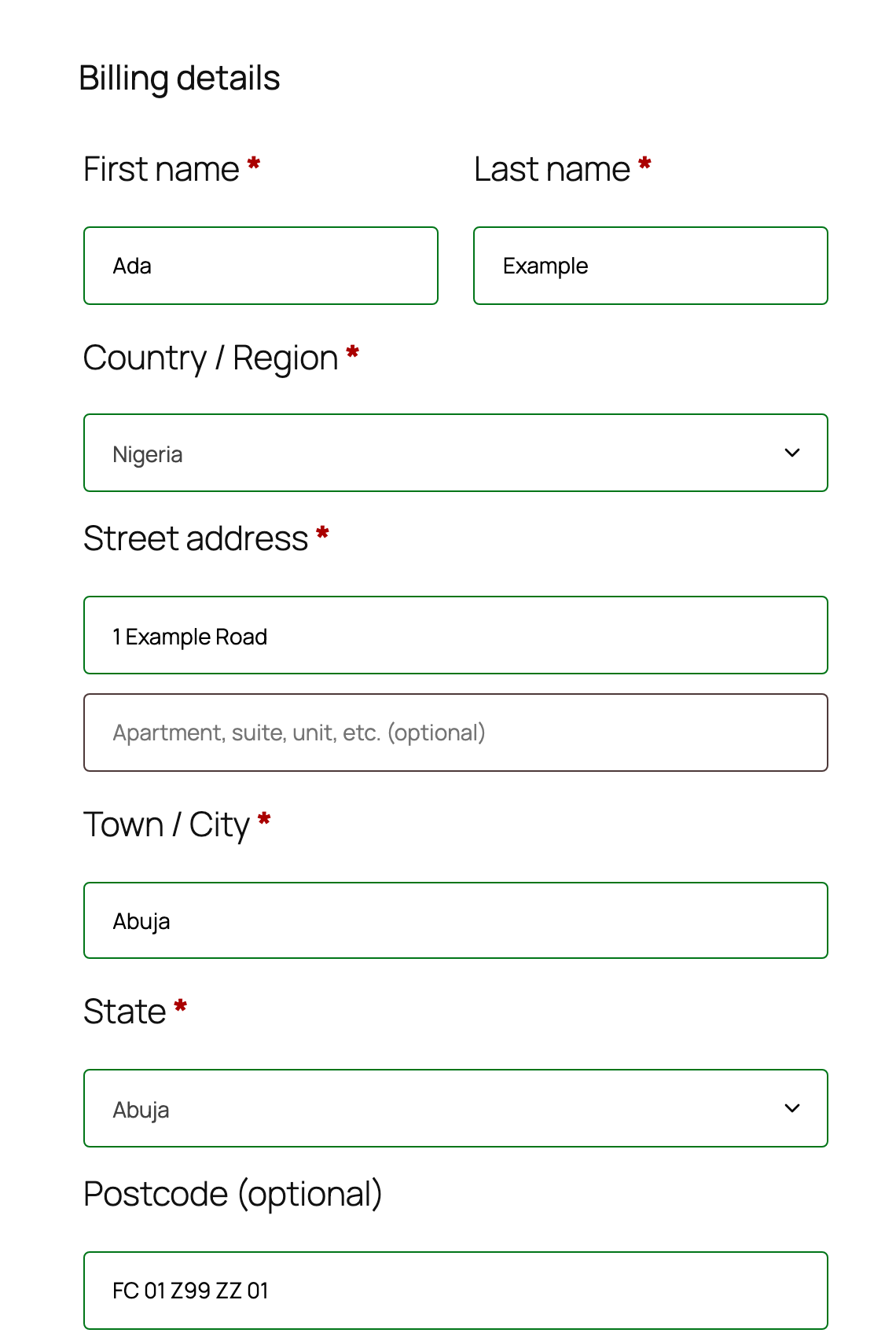
The plugin stores the postcode in its standard form, such as FC-01-Z99-ZZ-01. It copies the postcode into the address of the order, so shipping plugins see it. The orders list shows the postcode and the result of the check. The plugin works with order tables (HPOS) and with orders stored as posts.
The format check needs no key. It runs on your server and sends nothing to NIPOST.
Look up each postcode
Section titled “Look up each postcode”With a live secret key and the lookup on, the plugin asks NIPOST whether each postcode exists. It asks after the customer places the order, not while the customer types. It sends one request for each different postcode of the order. The billing and shipping addresses share one request when they hold the same postcode.
A payment retry reuses the order. The order remembers the answer for each address. A retry sends only a postcode that has no answer yet, or a postcode that changed. The plugin never retries by itself.
NIPOST receives these items:
- The postcode in its standard form.
- Your secret key, in the
X-API-Keyheader. - The IP address of your shop server. NIPOST sees it with each request.
The plugin sends no name, email address or other part of the address. It never sends an old 6-digit postcode. Read NIPOST’s terms of use, acceptable use policy and privacy policy before you enter a key.
Read the result of a check
Section titled “Read the result of a check”The order keeps the result in the order meta _gatepost_postcode_check. An order with two addresses gets the status that needs the most attention.
| Status | Meaning |
|---|---|
valid |
NIPOST knows the postcode. |
invalid |
NIPOST has no record of the postcode. An order note asks you to check it with the customer. |
unchecked |
The plugin did not ask NIPOST. The store has no key, or the lookup is off. |
error |
The lookup failed. An order note gives the cause. The orders list shows “Check failed”. |
An old 6-digit postcode that the store accepts also gets unchecked, because NIPOST never receives it.
When the lookup fails
Section titled “When the lookup fails”A failed lookup never stops an order. The plugin waits at most 3 seconds for each postcode. The order keeps the postcode that the customer typed, with the status unchecked or error. An order note names the true cause, and it asks you to check the postcode by hand.
NIPOST’s service can be slow or down, and a store must not lose a sale for that reason. A postcode that NIPOST does not know also does not stop the order. It gets the status invalid and a note.
The notes and the WooCommerce log name a postcode with its last part hidden, such as FC-01-Z99-ZZ-**.
Export and erase requests
Section titled “Export and erase requests”The plugin answers the export and erase tools of WordPress. The export holds the postcodes of an order and of a customer’s saved address. An erase request removes them. It keeps the check status, which is not personal data. The plugin also adds suggested text to the privacy policy page of your store.
Next steps
Section titled “Next steps”- Read the “External services” section of the plugin’s
readme.txtfor the full text of what it sends to NIPOST. - Read the postcode grammar that the format check follows.
Unofficial. Not made or endorsed by NIPOST.